 Australia
 Canada
 Cayman Islands
 Dominican Republic
 Hong Kong
 India
India
 Indonesia
 Ireland
 Jamaica
 Singapore
 Thailand
 United Kingdom
 United States
 Vietnam

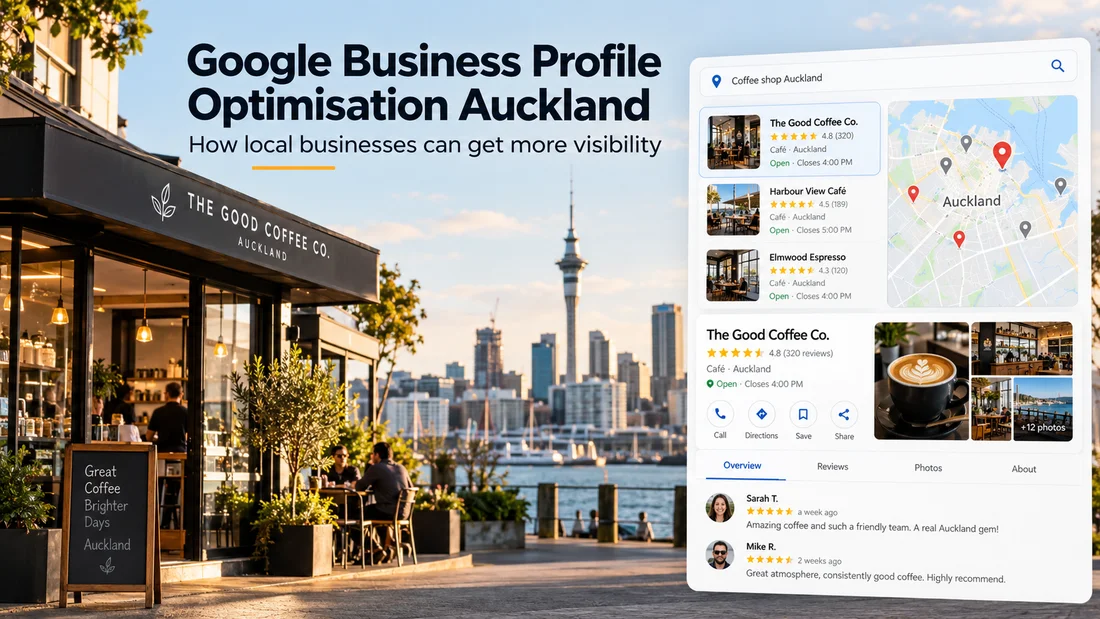
Someone searching for a plumber, electrician, builder, accountant, clinic, restaurant or other local service may see Google Maps and business profiles before they ever reach a traditional website result.
At that point, the customer may already be comparing:
reviews
photos
opening hours
services
location
business information
website links
competitors nearby
That is why Google Business Profile optimisation in Auckland should not be treated as simply filling out an online directory listing.
It is part of your local lead-generation system.
What does Google Business Profile optimisation actually mean?A Google Business Profile — previously called Google My Business — allows a business to appear across Google Search and Google Maps.
But simply creating a profile is not the same as optimising one.
Optimisation means making sure Google can clearly understand:
What your business does.
Where you operate.
Which searches your business is relevant to.
At the same time, the profile needs to give potential customers enough information and confidence to take the next step.
For Auckland businesses, that might mean a customer finding you after searching:
“electrician Auckland”
“plumber near me”
“builder North Shore”
“physio Newmarket”
“accountant Auckland”
or another service-plus-location search.
The objective is not just to appear.
The objective is to be relevant enough to get considered — and convincing enough to generate an enquiry.
1. Make sure your Google Business Profile is verifiedBefore worrying about advanced Google Maps optimisation, make sure you actually control the listing.
Google may provide different verification methods depending on the business and circumstances.
Once verified, you can properly manage the information customers see in Google Search and Maps.
This also helps protect the profile from incorrect changes and gives you access to performance information.
For service-area businesses such as electricians, builders, cleaners and mobile services, you may not need to display a physical address publicly.
The important thing is setting the business up accurately according to how it actually operates.
2. Choose the right primary business categoryThis is one of the first things I would check when auditing a Google Business Profile.
Your category helps Google understand what kind of business you are.
Be specific.
If you are an electrician, use the most appropriate electrician category rather than something vague such as “contractor”.
If you operate a physiotherapy clinic, choose the category that most accurately describes the main service.
Secondary categories can then be used where they genuinely represent additional services.
More categories are not automatically better.
The objective is clarity.
3. Complete your business information properlyOne of the simplest parts of Google Business Profile optimisation is also one of the most commonly neglected.
Go through every relevant part of the profile and check it.
That includes:
business name
address or service area
phone number
website
opening hours
holiday hours
business categories
services
attributes
business description
Google itself recommends keeping Business Profile information complete, accurate and current. Local results are mainly determined by relevance, distance and prominence, so accurate information helps Google understand when a business is relevant to a local search.
Avoid trying to manipulate this by stuffing keywords into your business name.
Use the real name customers know your business by.
4. Add photos that help customers make a decisionPhotos are not there simply to make the listing look busy.
They should answer questions.
For an Auckland tradie, useful photos could include:
completed projects
vehicles
team members
before-and-after work
equipment
jobs in progress
For a clinic or professional service:
the premises
treatment rooms
staff
reception area
signage
For hospitality:
food
interior
exterior
seating
staff
Real photos provide evidence.
A potential customer can see that the business exists, understand what to expect and get a better feel for whether they want to contact you.
Google also specifically recommends adding photos and videos to help customers understand what a business offers.
5. Build a consistent review processReviews matter for two different reasons.
First, they influence the customer.
If two Auckland businesses offer similar services but one has a strong history of detailed customer reviews and the other has very little feedback, that difference can affect which business gets contacted.
Second, reviews also contribute to the wider prominence signals Google uses when determining local results.
The solution is not to suddenly collect 30 reviews once every two years.
Build asking for reviews into the normal customer process.
For example:
Job completed → customer satisfied → send review link.
Then respond to the reviews you receive.
For positive feedback, acknowledge the customer properly.
For negative feedback, respond professionally and try to resolve the problem rather than arguing publicly.
Never buy fake reviews.
A smaller number of genuine reviews is more valuable to your reputation than manufactured social proof.
6. Keep the profile useful and currentA Google Business Profile should reflect what is happening in the actual business.
If your hours change, update them.
If you introduce a new service, add it.
If you complete a strong project, add photographs.
If you have a genuine update, offer or event, consider publishing a Google post.
This is less about chasing some secret algorithm trick and more about making sure the information customers encounter is useful.
A customer finding outdated opening hours or incorrect contact information has a poor experience before they have even spoken to you.
7. Connect your Google Business Profile to the right website pageThis is an area businesses often underestimate.
Google Business Profile optimisation and website SEO should work together.
Imagine someone searches for a local service.
They find your profile.
Your reviews look good.
Your photos create confidence.
Then they click your website.
And the website is slow, vague or difficult to navigate.
The customer can still leave.
That means the Google profile did its job — but the rest of the customer journey failed.
Your landing page should clearly communicate:
what service you provide
where you provide it
why the customer should trust you
examples of your work
reviews or other evidence
how to contact you
For businesses targeting several Auckland areas, useful service and location content on the website can also strengthen the overall local search strategy.
8. Don't think of Google Maps SEO as a standalone tacticBusinesses sometimes ask how to “rank number one on Google Maps”.
There is no setting you can switch on to make that happen.
Google explains that local rankings are mainly based on:
Relevance — how closely the business matches what the person is searching for.
Distance — how far the business is from the person searching.
Prominence — how established or well known the business appears to be.
This is why Google Maps SEO in Auckland is broader than editing a listing.
Your website matters.
Your reviews matter.
Your business information matters.
Your reputation matters.
Your location matters.
Your competition matters.
And all of these signals work together.
9. Track what actually generates enquiriesVisibility by itself is not the final objective.
You should be asking:
Are people calling?
Are they visiting the website?
Are they requesting directions?
Are they submitting enquiries?
Which searches are leading customers to the business?
Google Business Profile provides performance information that can help you understand how customers are finding and interacting with your listing.
Use that information alongside your website analytics and lead tracking.
Because getting more profile views is useful.
Getting more qualified customers is better.
Google Business Profile optimisation should support revenueThis is the main point I would make to Auckland business owners.
Don't optimise your Google Business Profile simply because an SEO checklist tells you to.
Think about the customer journey.
Search → Google Business Profile → trust → website → enquiry.
Every part should make the next step easier.
For a local service business, that could ultimately mean:
more phone calls
more bookings
more quote requests
more website enquiries
more customers
That is the business outcome Local SEO is supposed to support.
Want to optimise your Google Business Profile?I’ve put together a detailed step-by-step Google Business Profile guide for Auckland businesses, covering profile setup, categories, business information, photos, reviews and ongoing optimisation.
You can read the full guide here:
https://www.kiwiwebdesign.co.nz/google-business-profile-guide-for-auckland-businesses/
At Kiwi Web Design, we also help Auckland businesses with Google Business Profile optimisation, Local SEO and Google Maps visibility as part of a wider lead-generation strategy.
Because appearing in local search is only the first step.
The real objective is turning that visibility into enquiries and customers.